

Overview
It is extremely essential for data-driven enterprises to prepare tailored data marts from a central data warehouse for serving various user groups or clients. These data marts are customised for specific purposes, ensuring that each team or client has access to the insights they need. However, designing a multi-tenant architecture that balances security, scalability, and granular user access control is crucial for maximising the efficiency and value of this data.
In this article, we explore how to implement a multi-tenant architecture in a DBT project. This setup ensures data isolation, enhanced security, and granular user access by creating a dedicated data mart folder and separate profiles.yml configuration for each client.
Key Components
- Data Mart folder for each Client: Each client has its own data mart folder within the DBT project, enabling organised management of models, tests, and documentation specific to that client.
- Separate profiles.yml configuration: Each client will have a dedicated profiles.yml file containing separate database credentials. This ensures that each client’s data is isolated and secure, with access restricted to authorised users only.
profiles.yml template
client1:
  outputs:
    dev:
      dbname: <client1_db>
      host: <client1_db_server_host>
      user: <client1_db_username>
      pass: <password>
      port: 5432
      schema: <datamart_destination_schema>
      threads: 1
      type: postgres

  target: dev
Folder Structure
The project should be organised as follows:
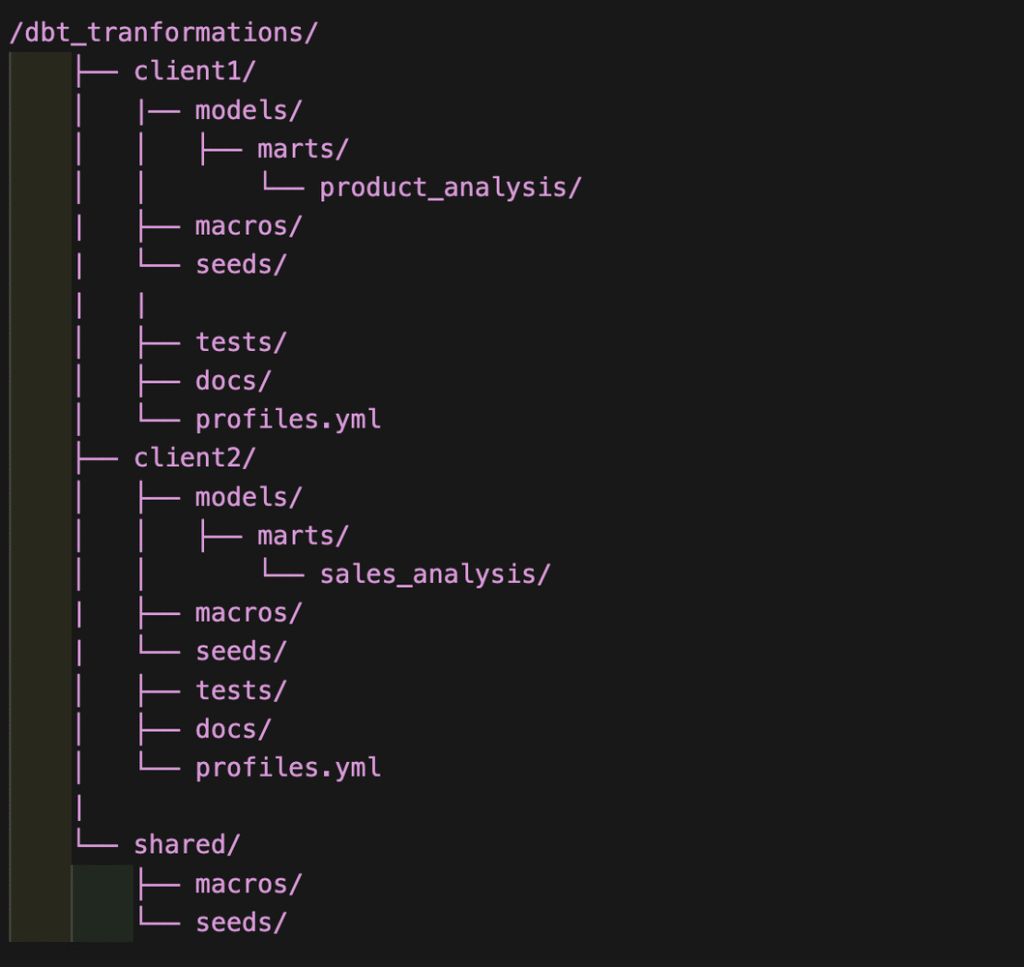
- client1/ and client2/: Separate folders for each client containing their specific models, tests, and documentation.
- profiles.yml: Each client folder contains a profiles.yml file with database credentials specific to that client.
- shared/: Contains shared resources like macros and seeds that can be used across different client projects.
Build Models for a client
To build models for a specific client, use the following command:
dbt run --project-dir <PROJECT_PATH>/client1 --profiles-dir <PROJECT_PATH>/client1
Test Models for a client
To test models for a specific client, use the following command:
dbt test --project-dir <PROJECT_PATH>/client2 --profiles-dir <PROJECT_PATH>/client2
Orchestration with Prefect or Airflow
Orchestrating DBT with tools like Prefect or Airflow allows for parallel and scheduled transformations across multiple clients, improving scalability and efficiency.
Benefits of this approach
- Data Isolation: Each client’s data is kept in separate databases.
- Security: Dedicated profiles.yml with unique credentials per client enhances security.
- Granular Access: Control who can access and modify data on a per-client basis.
- Scalability: Easily add new clients without disrupting existing setups.
Conclusion
This multi-tenant approach in DBT simplifies managing data transformations for multiple clients. It ensures data isolation, enhances security, and provides a scalable solution for organisations handling diverse client datasets.